

🧐 What do the lights on your Vumatel Fibre Box Mean? #
Curious about the lights on your Vumatel Fibre Box? We’ve got you covered! Below, we explain what each light means, how they should look during normal operation, when there is a signal fault, and the steps to take if something’s broken.
⚡️ Find your Fibre Box #
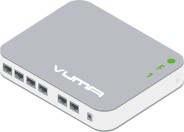
- Vumatel VX Fibre – Used on Vuma’s Active Ethernet (AE) Network
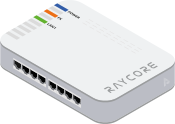
- Vumatel Raycore – Used on Vuma’s Active Ethernet (AE) Network
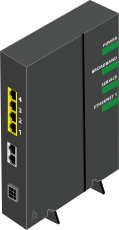
- Vumatel Calix – Used on Vuma’s GPON Network
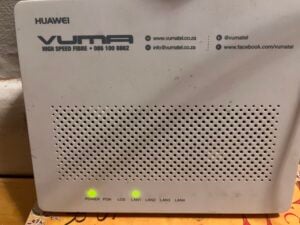
- Vumatel Huawei – Used on Vuma’s GPON Network
Update: 3 June 2026 – The Huawei GPON ONT needs to be added to this guide. It has the following lights: POWER, PON, LOS, LAN1, LAN2, LAN3, LAN4.
 |
 |
||
| Label | Indicator | Meaning | Action Steps |
|---|---|---|---|
| Power | 🟢 | Green: CPE has power | No action required |
| Off | Off: No power | Check your CPE is plugged in and getting mains/UPS power | |
| F | 🟢 | Green: Normal | No action required |
| 🟠 | Orange: Unconfigured | Port recreate needed | |
| Off | Off: Fibre Fault | Restart CPE, and check thin fibre cable is not kinked. If it stays off contact support | |
| 1 | 🟢 | Green Blinking: Data flowing | No action required |
| Off | Off: No data connection | Check cable between CPE and WiFi router is clicked in and the WiFi router is powered on | |
|
 |
||
| Label | Indicator | Meaning | Action Steps |
|---|---|---|---|
| Power | 🔵 | Solid Blue: CPE has power | No action required |
| 🔵/⚪️ | Blue Blinking | CPE has not retrieved a configuration yet. Please contact support | |
| Off | Off: No power | Check your CPE is plugged in and getting mains/UPS power | |
| FX | 🟠 | Orange: Normal | No action required |
| Off | Off: Fibre Fault | Restart CPE, and check thin fibre cable is not kinked. If it stays off contact support | |
| LAN 1 | 🟢 | Green: Normal data flowing | No action required |
| Off | Off: No data connection | Check cable between CPE and WiFi router is clicked in and the WiFi router is powered on | |
|
 |
||
| Label | Indicator | Meaning | Action Steps |
|---|---|---|---|
| POWER | 🟢 | Green: ONT has power | No action required |
| Off | Off: No power | Check your ONT is plugged in and getting mains/UPS power | |
| BROADBAND | 🟢 | Green: Normal | No action required |
| Off | Off: Fibre Fault | Restart ONT, and check thin fibre cable is not kinked. If it stays off contact support | |
| SERVICE | 🟢 | Green: ISP Service is up | No action required |
| Off | Off: No connection | Restart ONT, if it stays off, contact support to create a support ticket | |
| ETHERNET | 🟢 | Green Blinking: Data flowing | No action required |
| Off | Off: No data connection | Check network cable between ONT and WiFi router is clicked in and the WiFi router is powered on | |